Run AI Models Locally 2026: Hardware and Setup Guide
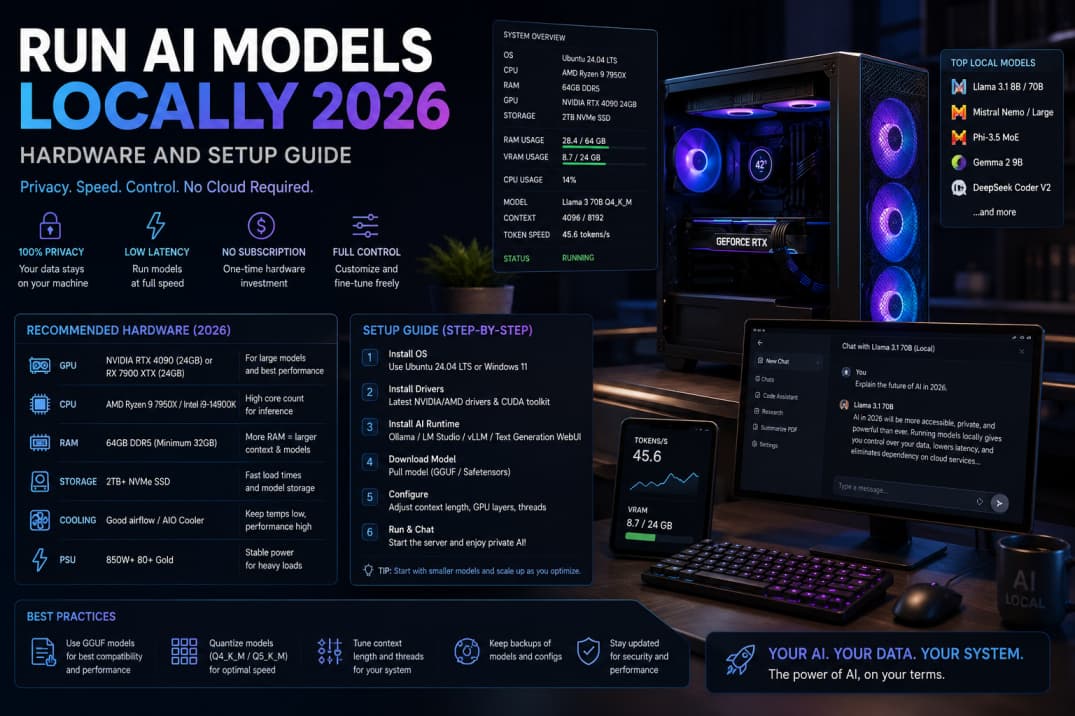
Local AI appeals to users who handle sensitive documents or want offline access during travel. Running models on your own hardware trades cloud convenience for control, electricity costs, and setup time.
Hardware requirements
GPUs with sufficient VRAM matter more than CPU branding for most open models. Unified memory on some laptops helps smaller quantizations. Check community benchmarks for the model size you target—7B, 13B, or larger.
Quantization explained
Quantized weights reduce memory use with modest quality loss. Q4 and Q5 formats balance speed and coherence for chat. Experiment before assuming you need the largest parameter count.
Popular local runtimes
Tools like Ollama, LM Studio, and llama.cpp simplify downloads and chatting. Developers may prefer direct Python environments with transformers libraries for customization.
Privacy advantages
Prompts stay on your machine—ideal for draft legal notes or proprietary code experiments. Air-gapped setups suit regulated environments with strict data residency rules.
Limitations
Local models may lag cloud frontier models on complex reasoning. Updates require manual pulls. Power draw and fan noise increase during long sessions.
Getting started
Pick one starter model, verify checksums, allocate disk space for weights, and test simple prompts before integrating with other apps.
Bottom line
Local AI is a privacy tool and learning project, not always a full replacement for top cloud models.