Browser Privacy Guide 2026: Extensions and Settings
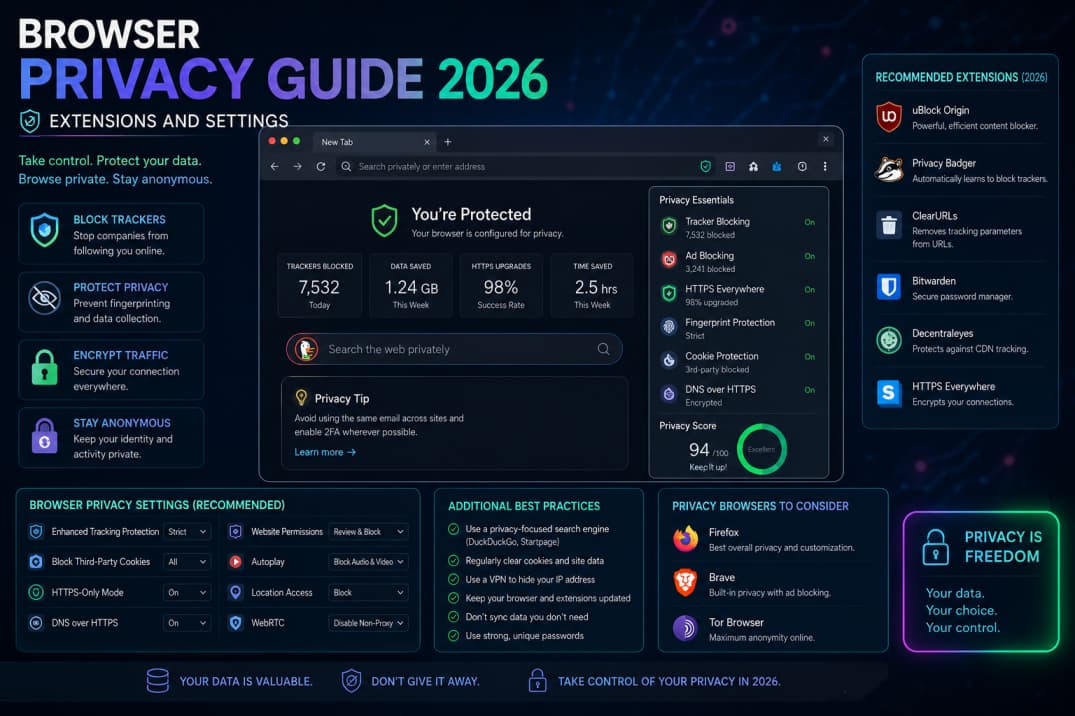
Your browser knows more about daily life than almost any app. Small setting changes and a short list of trusted extensions dramatically reduce tracking without breaking the sites you need.
Choose a browser with updates
Use browsers that receive frequent security patches. Enable automatic updates. Separate work and personal profiles if you juggle accounts.
Essential privacy settings
Block third-party cookies where possible, limit location access, and clear permissions for old sites. Review saved passwords and remove duplicates. Turn on enhanced protection modes if available.
Extensions worth considering
Ad and tracker blockers reduce clutter and malware risk. Password managers generate unique credentials. Avoid installing too many extensions—each can read page content.
HTTPS and public Wi-Fi
Look for padlock icons on login pages. Avoid sensitive banking on café networks without a reputable VPN. VPNs hide traffic from local networks but still require trusting the VPN provider.
Phishing awareness
Check sender addresses and URLs before clicking. Use hardware security keys or app-based two-factor authentication on email and banking. Report suspicious messages instead of forwarding them.
Kids and shared computers
Use guest profiles on shared PCs. Sign out of accounts on library machines. Clear downloads folder after sessions.
Summary
Update the browser, harden defaults, use a password manager, and stay skeptical of urgent links. Privacy is maintenance, not a one-time install.