Cloud Storage Compared 2026: Backup and Sync for Everyone
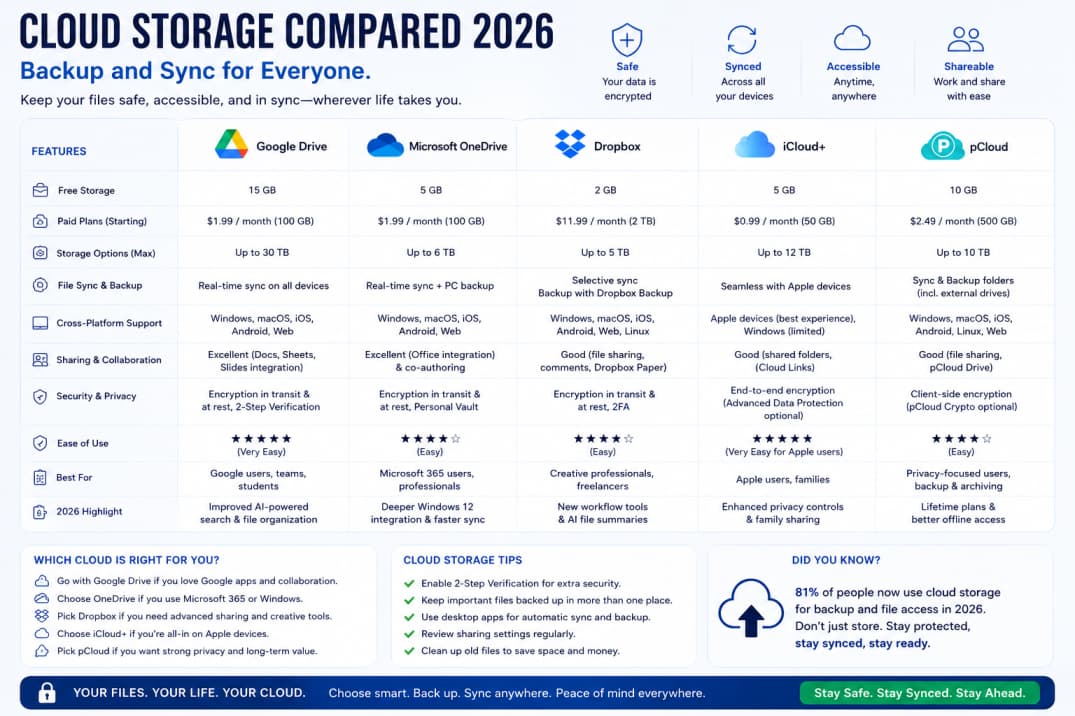
Cloud storage is backup, sync, and collaboration in one marketing phrase. Understanding which job you need—phone photo safety, team folders, or full-device backup—prevents paying for the wrong tier.
Sync vs backup
Sync mirrors folders across devices; deleting locally can delete cloud copies. Backup tools version history and restore deleted files. Use both: sync for active projects, backup for archives and ransomware recovery.
Major ecosystem players
Apple, Google, and Microsoft bundles integrate tightly with their operating systems. Third-party options appeal when you want encryption or cross-platform neutrality. Compare price per terabyte and family sharing rules.
Security and encryption
Enable two-factor authentication on accounts. Understand whether files are encrypted at rest only or end-to-end for specific products. Sensitive documents may need client-side encryption tools beyond default cloud features.
Photo libraries
Phone backups fill storage quickly. Review duplicate uploads and large video files annually. Some services compress previews—verify original quality settings.
Work collaboration
Shared drives need clear folder permissions and offboarding checklists when employees leave. Version history saves you when someone overwrites a spreadsheet.
Local copies still matter
Follow a 3-2-1 rule: three copies, two media types, one offsite. Cloud is offsite, but an external SSD at home speeds restores after account lockouts.
Bottom line
Pick one primary ecosystem, add a true backup tool, and audit storage yearly before auto-renewing oversized plans.