Tablet vs Laptop 2026: Which Device Fits Your Workflow?
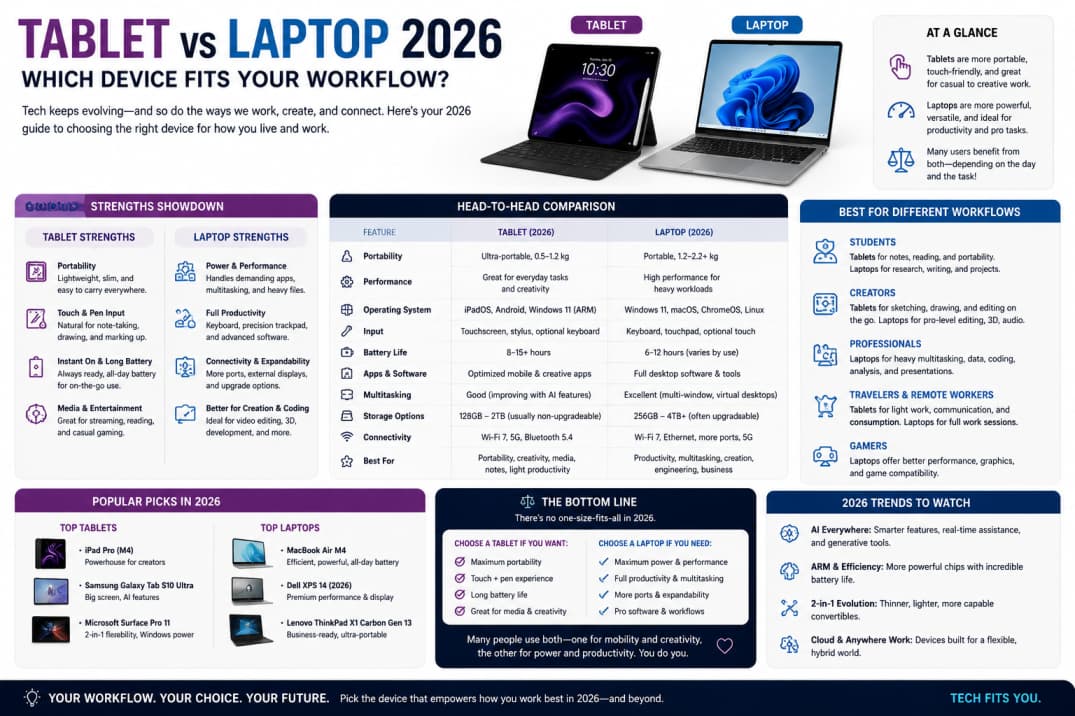
Tablets with keyboard cases and laptops with touchscreens blur old categories. Choosing between them is less about hype and more about the software you must run and how mobile you need to be.
When a tablet wins
Reading, markup, light email, streaming, and stylus note-taking shine on tablets. Artists and students who annotate PDFs often prefer a pen-first device with long battery life and instant wake.
When a laptop wins
Full desktop browsers, complex spreadsheets, coding environments, and pro video editing still favor laptops with trackpads, ports, and cooling for sustained loads. If you live in desktop-class apps, a tablet becomes a secondary screen.
Keyboard cases and ergonomics
Tablet keyboards are fine for short sessions but can strain wrists during full workdays. Consider a stand at eye level and external keyboard if the tablet is your primary computer.
Software ecosystems
iPadOS, Android, and Windows each differ in file management and multitasking. Verify your must-have apps before purchase—some desktop licenses do not transfer to mobile versions.
Connectivity and ports
Laptops typically offer more USB ports and external monitor support. Tablets rely on dongles or wireless docks. Photographers and editors should confirm SD card and storage expansion options.
Budget comparison
A mid-range laptop often costs less than a flagship tablet plus keyboard and pen. Calculate total accessories, not base price alone.
Summary
Pick tablets for portability and pen workflows; pick laptops for heavy productivity. Hybrid users may own both with clear roles for each.