Mechanical Keyboard Guide 2026: Switches, Layouts, and Comfort
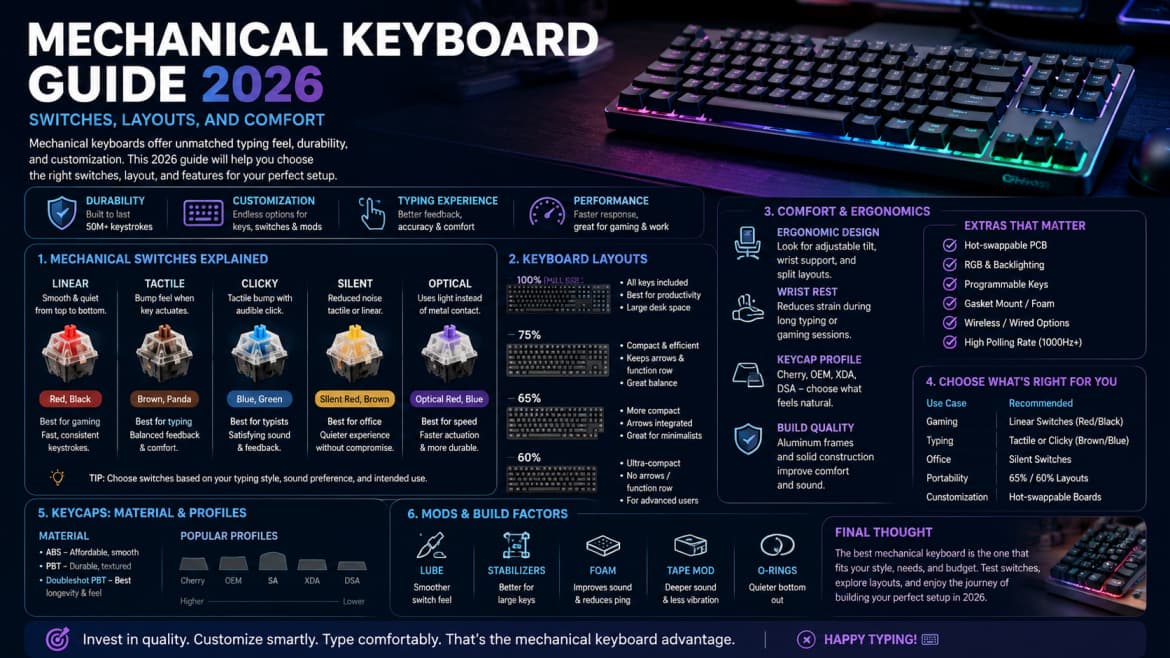
Mechanical keyboards dominate desks in 2026 because switches last longer and feel more precise than most membrane boards. The wrong switch type, however, can annoy coworkers or tire your fingers during long writing sessions.
Switch types simplified
Linear switches press smoothly—popular for gaming. Tactile switches add a bump for feedback without loud clicks—good for typing. Clicky switches are audible—fun at home, risky in open offices. Try switch testers before committing.
Layout and size
Full-size boards include number pads. TKL and 75% layouts save desk space. Learn where arrow keys and function rows move on compact layouts before you muscle-memory the wrong positions.
Hot-swap and customization
Hot-swap PCBs let you change switches without soldering. Keycap profiles and materials alter sound and grip. Modding is optional; stock boards from reputable brands are fine for most users.
Wireless and battery life
Bluetooth boards travel well but may add latency for competitive gaming. Dual-mode boards switch between USB and wireless. Expect to charge weekly with RGB lighting enabled.
Ergonomics and wrist strain
Consider tenting, negative tilt, or separate ergonomic boards if you type all day. Wrist rests help only when height and angle are already correct.
Noise and office etiquette
Rubber o-rings, foam mods, and silent switch variants reduce sound. Ask teammates before bringing clicky boards to shared spaces.
Summary
Pick tactile or linear switches based on feel tests, choose a layout that fits your desk, and prioritize comfort over RGB aesthetics.