Home Office Monitor Setup 2026: Size and Ergonomics
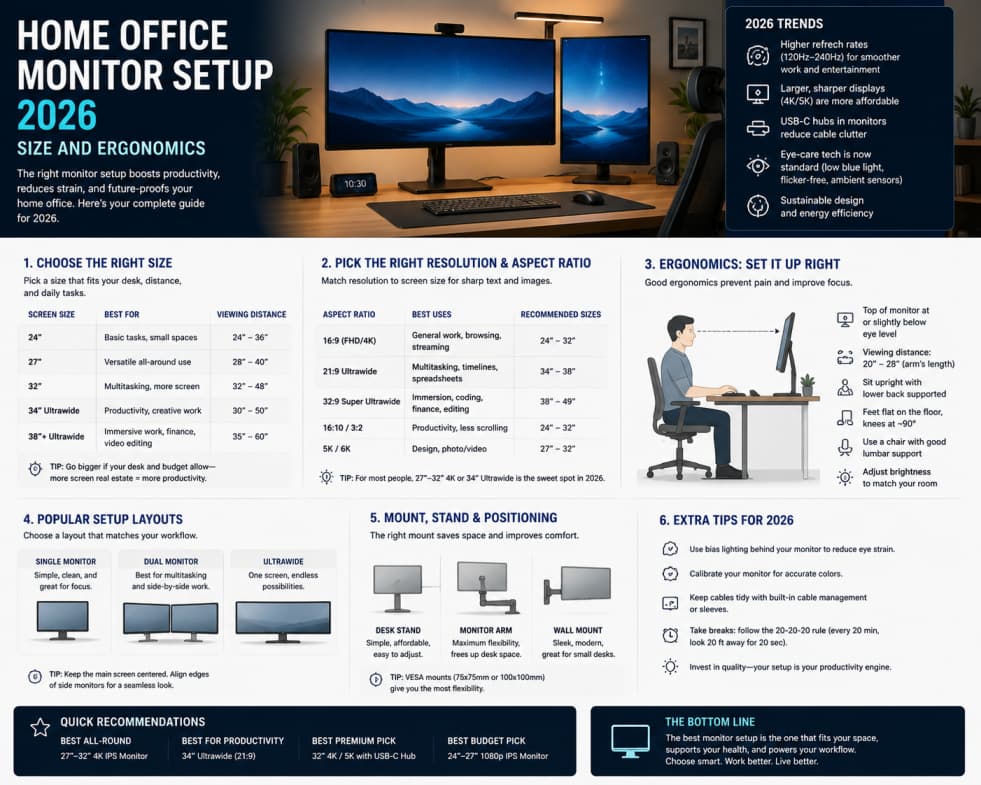
A poor monitor setup causes eye strain, neck pain, and lost focus during long workdays. In 2026, excellent panels are affordable, but choosing size, resolution, and arrangement matters more than chasing the highest refresh rate for spreadsheet work.
Size and resolution pairings
A 27-inch 1440p display is a sweet spot for sharp text without scaling quirks on Windows and macOS. 32-inch 4K helps creators who need detail for photo and video timelines. Avoid 1080p on large panels where individual pixels become visible at normal viewing distances.
Refresh rate and panel type
60 Hz is enough for office tasks. Higher refresh rates help if you also game on the same desk. IPS panels offer better viewing angles; VA can improve contrast for movies; OLED looks stunning but watch for burn-in if static toolbars stay on screen all day.
Dual monitors vs ultrawide
Dual displays excel for video calls on one screen and documents on another. Ultrawide monitors reduce bezel gaps and simplify cable management. Pick based on whether you share windows side by side daily or prefer one continuous canvas.
Ergonomics and eye comfort
Top of the screen near eye level, arm's length distance, and slight downward gaze reduce neck strain. Use monitor arms to free desk space. Enable night modes cautiously—they help evenings but can shift color accuracy for design work.
Connectivity and docking
USB-C docks with power delivery charge laptops and drive displays through one cable. Confirm your laptop supports the resolution and refresh rate you want on each port. HDMI and DisplayPort versions still matter on older machines.
Calibration and brightness
Avoid max brightness in dark rooms; match ambient light when possible. Hardware calibration is optional for most office users but valuable for photo editors who need consistent color.
Practical buying checklist
27-inch 1440p IPS for general work, adjustable stand or arm, and a dock if you use a laptop closed on the desk. Add a second monitor only when you consistently lack screen space.
Summary
Invest in ergonomics and resolution before gimmicks. A comfortable, sharp display pays back every hour you work from home.